 Order Now

Contents
- FTP tutorial
- FTP clients
FTP clients
GUI based FTP software
Almost any file management software has remote access capability included and can be used for file transfer purposes.
Windows OS based FTP client
As there are many ftp clients now offered currently, there is one of them which can be used as a file manger as well as the ftp client and is named Total Commander which ftp services are explained below.
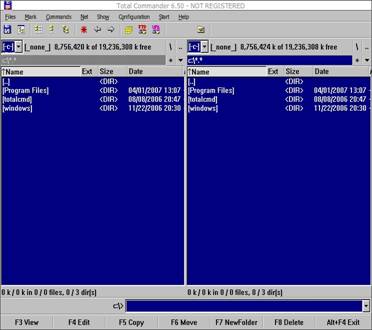
This is the initial screen and default look which is appeared when the Total Commander is started. The main window is separated into two sections as shown at the screen shot and each of them is showing the current folder from where the Total Commander is executed.
The folders can be browsed by simple double click on the left button of the mouse. The keyboard navigation is also supported but is deprecated.
Files can be copied from the left side to right one and vice versa to the corresponding folders.
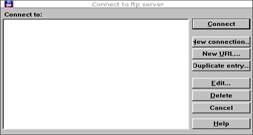
The ftp settings are invoked by pushing the button at the upper side of the Total Commander window named FTP. At the main window of the ftp settings the existing and sessions that are already saved will appear (now empty).
At the right side are buttons related to the creating new session, managing of existing one and finally exiting the ftp client.
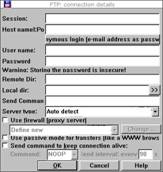
New Connection relates to the interface where the details regarding the new connection are stated within.
FTP Session Name field is for the name of the session which will be created.
Host name field is for the destination server's domain name or it's IP address.
FTP Username field stands for the user name which will be required upon session negotiation with the assigned Password if the remote server requires authentication.
If the remote server does not requires username/password related authentication the button above Anonymous Login should be used and the email address will be required.
This stands for the public ftp servers that are available an accessible by anyone. Other fields should remain blank and are related to more specific session settings parameters.
Once the correct values are stated within the fields the session can be started.
Depending on which side of the main window (left or right one) the remote file list will appear accordingly. Manipulating with files (coping, moving and deleting) services are the same as it's done locally with the local files.
You can download Total Commander from this link:
http://www.ghisler.com/700beta.htm
Ftp hosting with our support and amazing offer is made easy. Check out VPS hosting packages
Unix/Linux OS based GUI FTP Clients
The FTP GUI clients are almost the same as are for the Windows OS based ones and operating and using the clients are based on the same rules as the former ones does.
Every Linux distribution comes with the default KDE or Gnome X-windows interfaces and therefore each one has it's own ftp related clients. One of the most often used is gFTP
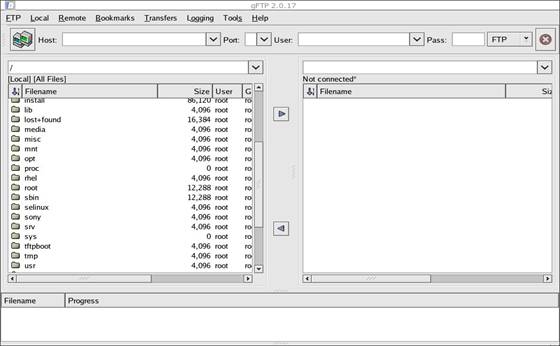
The gFTP clinet's main window is separated to two sides, left one is for the local file system and the right one will be for the remote server's file list once the session is established and remote server accessed.
At the Host field the domain name or IP address of the remote ftp server is to be stated.
The FTP Port is not required as the default one (21/tcp) will be used.
User and Pass fields are required if the remote server requires authentication upon session initiation. If the remote server is public one and is available to anyone the User should be stated as Anonymous and Pass field should contain an email address.
Manipulation level of the files between the local and remote side is thrown to simple dragging files from each one to another.
You can download gFTP from this link: http://gftp.seul.org/


